

Audio · Video · Image Launcher

SAMPLERMASTER 6

Your ultimate tool for launching audio, video and images on the fly with total agility

  • Instant playback with hotkeys
  • Automatic LUFS normalization per Slot
  • Unattended loading via WatchFolder
  • In-line waveform editor per Slot
  • Fade in/out and Volume/Pan automation per Slot
  • Mark In/Out and Independent Hardware Output per Slot
  • Remote control via OSC with visual Mapper
  • Synchronization via SMPTE TimeCode
  • Load and Launch VIDEOS and IMAGES
NEWTouch panel Touch PadLaunch Videos & Images
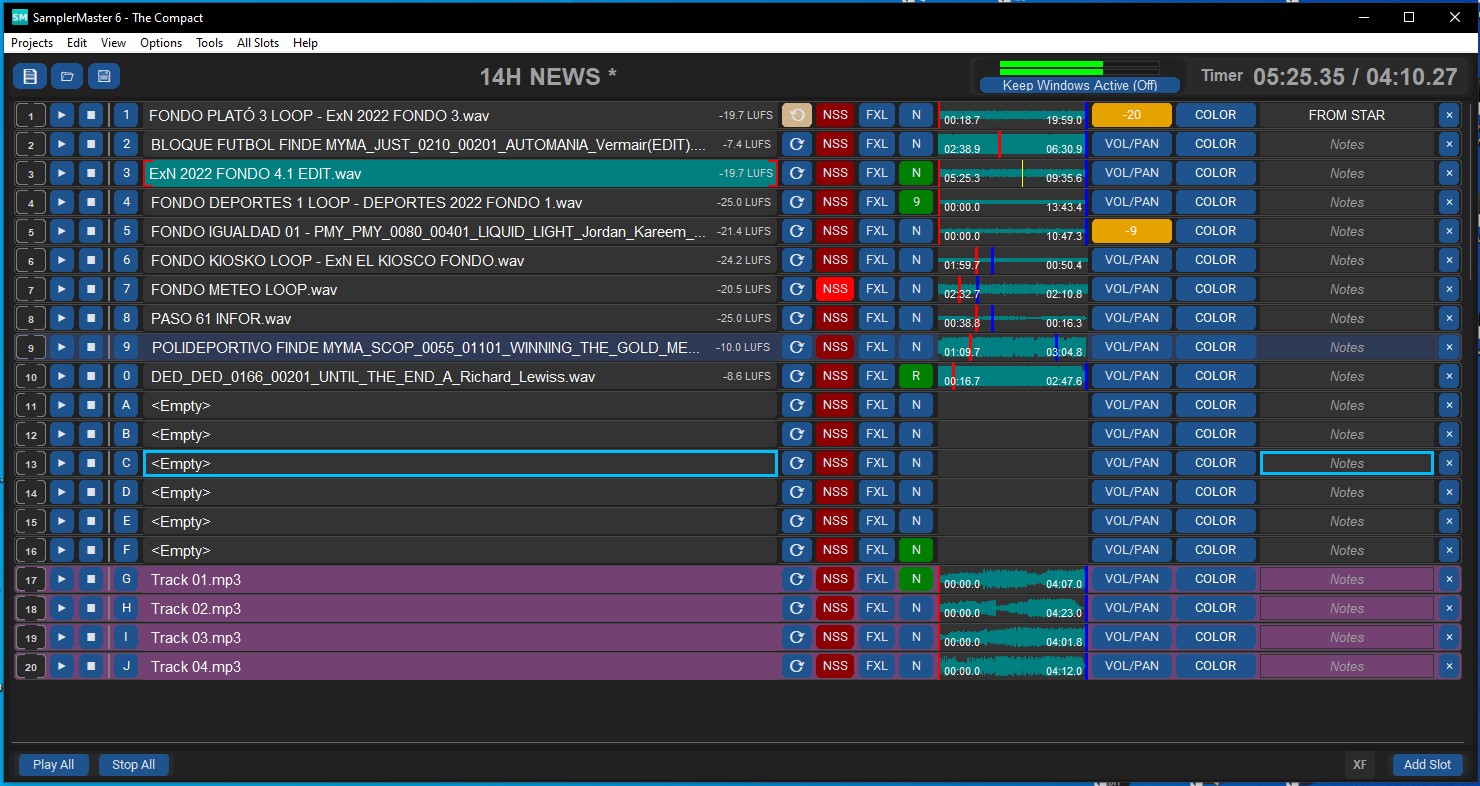
SamplerMaster 6 - Main Interface
Real-time VU Meter

Live Timer & VU

Version 6.3 • Windows 10/11

Live Sound

Thematic presets built by you, one asterisk and hotkey away. Rock, flamenco, corporate or system tuning.

You know every day brings a different job even though you're always the sound engineer. Today system tuning, tomorrow a rock gig, a flamenco or folk gig, or something corporate… and you shouldn't start from scratch every time. With SamplerMaster 6 your thematic presets will always be ready and improving with every gig because nothing gets lost: Pre-show and Post-show music, test noises, tones, sweeps, delay pulses or instrument samples to imagine how your rig will sound. And when you face one of those gigs where you have to fire audio tracks and they hand you 20 uneven files full of silences, you adjust Mark In, match loudness and tweak pitch on the fly. Because in live sound you don't need another player: you need a tool that understands every gig asks for a different version of you.

Hover to learn more

Watch video

Theater Sound

TAKE, TAKE & TAKE. Precise entries, zero margin for error. The next slot, always in CUE.

What you need in THEATER isn't a playlist. You need control: precise entries, ability to adapt to last-second changes and zero margin for error.

With Theater Mode it's simple: you press Enter and the audio plays; the next one is automatically queued in CUE (ReadyToPlay) and you'll only need to press Take (ENTER) when the time comes. Actor skips a line, order changes or everything gets shuffled? With + and ��� you jump to the slot you need without anyone noticing. Beds and ambiences in NSS (Non Stop Slot) that never stop, one-shot effects in FXL (Fx Launcher), Finish and Start Actions per slot, Mark In/Out, volume automation and independent hardware output per slot. All operable from a keypad in the middle of the console, or from any lighting console or other device thanks to OSC Control with a built-in visual Mapper. This isn't playing audio: it's running theater in SamplerMaster 6.

Hover to learn more

Watch video

Broadcast

Unattended slot loading via WatchFolder, playback LOG and in-line editing and automation. Speed and tracking with no excuses.

In broadcast material arrives when it arrives, and it must be ready without you watching over it.

WatchFolder and Smart WatchFolder monitor local or network folders where editing, production or directing drop the material: when a track, a clip or breaking news comes in, it's already located, loaded and in its SLOT.

Different types of playback LOG let you know what played, when and for how long — a non-negotiable requirement in Broadcast. Add momentary crossfade on the fly, numeric keypad control at the center of the console and in-line audio editing in real time per slot. In broadcast you don't just need another player: you need speed, automation and tracking.

Hover to learn more

Watch video
"Keys 0 to 9 are direct hotkeys, the dot is a general stop, and with + and – you move the CUE to mark the slot you want to launch with Enter."

Main Features

Everything you need for professional audio, video and image playback in live sound, theatre, broadcast and studio.

Multi-Slot Player

Unlimited slots with hotkeys for instant triggering. Fire audio instantly with professional precision and total control for live and broadcast.

Per-Slot Loudness, Pan & Fades

Set individually per slot an LUFSi target, panning, Fade In/Out, Play Delay and independent hardware output.

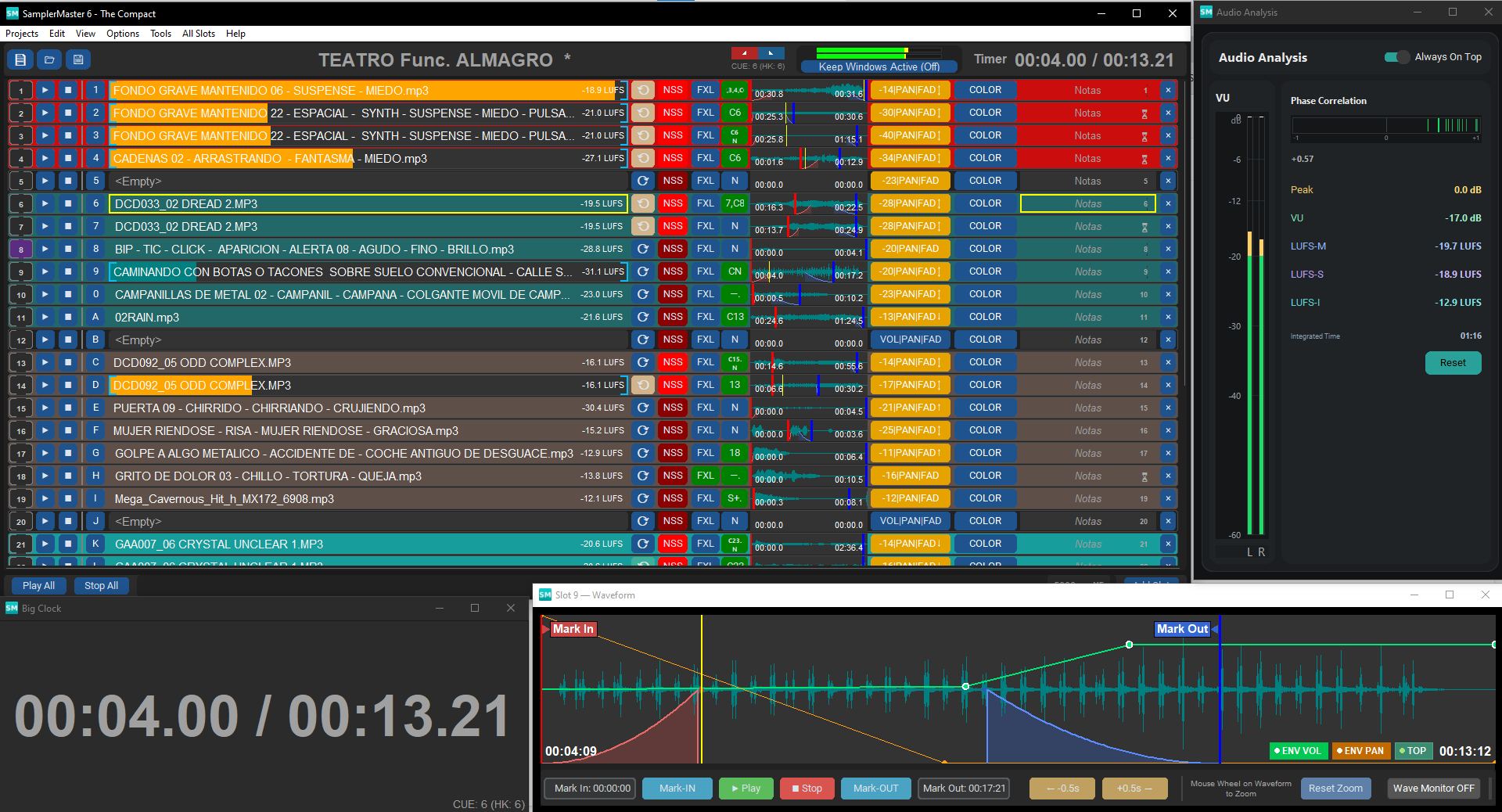
Wave Editor

Visually set Mark In and Out, Fades In and Out and automate Volume and Pan with professional precision using LQ or HQ waveforms to match your system's power.

WatchFolder

WatchFolder

Automatically detects new files and alerts visually

Project List

Find, load and switch projects in seconds.

Preview Window

Browse folders and pre-listen files before loading them

SMPTE TimeCode Sync

Trigger slots and actions synchronized to incoming or outgoing SMPTE TimeCode (LTC). Per-slot or dedicated CUE/Actions List automation modes, with internal loopback for testing.

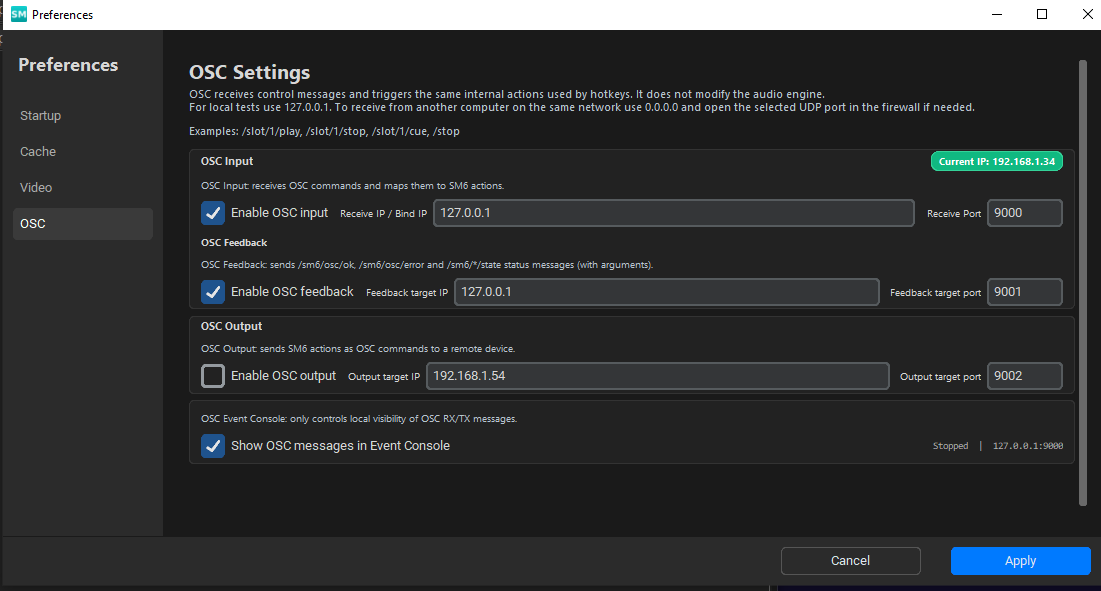
OSC Control

OSC Control

Control SamplerMaster 6 remotely from any OSC-compatible device. Configurable Input, Feedback and Output with custom ports and IP addresses.

Technical Specifications

System Requirements

Operating System

Windows 10 / 11

Processor

Intel Core i5 or higher

RAM Memory

4 GB minimum (8 GB recom.)

Supported Formats

Audio Formats

WAV, MP3, FLAC, OGG, AIFF, ...

Video Formats

MP4, MOV, MKV, AVI, WebM, MXF, ...

Image Formats

JPEG (.jpg, .jpeg), PNG

Bit Depth

16 / 24 / 32 bits

Channels

Mono / Stereo

Normalization

Integrated LUFS

Synchronization

SMPTE TimeCode (LTC)

Touch Interface

Full-screen, customizable Touch Pad panel

Remote Control

OSC (UDP) — Input / Feedback / Output + native OSC Mapper

Download SamplerMaster 6

Professional audio, video and image playback software

Full Version

  • 100% functional software
  • No time limitations
  • Updates included

Windows 10/11 • Version 6.3

Download Installer

Guided installation on your system

Traditional guided installation that places SamplerMaster 6 in its standard system location, creates Start menu shortcuts and allows clean uninstallation from the Windows Control Panel. Recommended if this is your main computer and you'll be using the software regularly.

  • Start menu and desktop shortcuts
  • Built-in uninstaller

Before installing, please note:

As this is an independent project, Windows SmartScreen will show you a warning. Don't worry: simply click "More info" and then "Run anyway".

We are a one-person project without the resources to pay for a Microsoft signature. We appreciate your trust: the software is completely safe. If you have any doubts, contact us before continuing.

Download Installer (.zip) — v6.3 • 01-12-26
.zip file • ~58 MB•

Download Portable Version

No installation, ready to use

Fully functional version with no installation required. Unzip the file to any location, including a USB drive, and launch SamplerMaster 6 instantly. Perfect for taking your professional setup to any studio, radio station or event. It doesn't modify the Windows registry or leave traces on the system when closed.

  • No installation required
  • Same full functionality

Reminder about Windows SmartScreen:

As with the installer, the first time you run SamplerMaster 6, Windows SmartScreen may show you a warning. Click "More info" and then "Run anyway".

We are a one-person project without the resources to pay for a Microsoft signature. The software is completely safe. If you have any doubts, contact us before continuing.

Download Portable (.zip) — v6.3 • 01-12-26
.zip file • ~175 MB•
HONORWAREPhilosophy

A model based on honesty

You can use it for free. We trust you'll support us if it's useful to you.

SamplerMaster 6 doesn't require any payment to run. We wanted to build honorware — software that imposes no technical limitation and forces no purchase, but appeals to the honesty of whoever uses the tool.

The philosophy is simple: if SamplerMaster 6 proves useful in your work, saves you time, makes your tasks easier or becomes part of your daily workflow, we invite you to support the project by getting a license. It's about keeping an honest and direct relationship with those who use the program.

Every license helps to sustain development, fix bugs, add improvements and keep the project alive. In short, you can freely evaluate and use SamplerMaster 6, but if it truly brings you value, we trust you'll know how to reciprocate by supporting its continuity.

How to support the project

  • During the first 5 seconds when opening the program you'll have the option to support the project.
  • At any time from the program's own Help > Support / Apoyo menu.

Frequently Asked Questions

Contact

Send us your testimonial, photos of you using the software at your gig, or your suggestions. We'd love to know if you find it useful.

Contact email

YouTube Channel

Tutorials, demos and software news

@samplermaster6

Visit channel